What Does It Do? Build for Outcomes with Continuous Inquiry
 Read Time: 6 minutes
How could a software tool meet every requirement and still fail? It happens when teams define the solution before defining the desired outcome.
Have you ever had a project keep growing and evolving to the point that it never got delivered? Or watched it get stripped down to an “MVP” that was so far from the original plan that it failed to deliver the intended value?
If so, you’re not alone.
According to a 2019 study conducted by Pendo, “80 percent of features in the average software product are rarely or never used. Publicly-traded cloud software companies collectively invested up to $29.5 billion developing these features, dollars that could have been spent on higher value features and unrealized customer value.”
In the previous article in our Continuous Inquiry series, we focused on asking the fundamental question: “Why should we build it?”
Now we move on to the second critical question to keep asking throughout your projects: “What does it do?”
It’s a deceptively simple question that seems obvious but is one of the most overlooked of the six in the Continuous Inquiry toolkit.
The solution: Describe before you prescribe.
Real-World Scenario: An Expensive Lesson in Failure
A global company wanted to make years of user research easier to find and reuse. They selected an expensive “atomic insights” platform, spent 18 months and roughly $450,000 implementing it, and loaded it with five years of studies.
It failed.
The software checked every box on the requirements list, but almost nobody used it. Adoption reached only about 2% of expectations because the people it was built for didn't find it valuable enough to change how they worked.
What went wrong? No one stopped to ask, “What does it need to do, and for whom?” The team jumped right from identifying a problem to selecting a solution without defining the desired outcome or how success would be measured.
Surprisingly, it was a summer intern tasked with figuring out how to improve adoption who finally asked, “What will it do, and for whom?” Once they reframed the problem around the outcome—make it easy for everyone to quickly find what the company already knows about its users, and what teams are working on learning next—the answer changed. They abandoned the costly platform and quickly built a much simpler internal solution that delivered the value they actually needed at a fraction of the cost.
The real pivot was the moment they shifted from prescribing what to build and started describing what it would actually help people do.
What This Question Uncovers (and Why It Matters)
Once we hear a problem, we have a natural tendency to skip right to solutions. We debate vendors, features, architecture, timelines, and budgets before we've defined what success actually looks like.
Asking “What does it do?” interrupts that pattern. It forces the conversation away from implementation and back to outcomes.
In a previous article, we explored Theodore Levitt’s famous observation: “People don’t want a quarter-inch drill bit; they want a quarter-inch hole.” Let’s take it one step further. Most people don't actually want a quarter-inch hole, either. They want to install shelving, run a cable, or mount a television. The hole is simply one way to achieve those outcomes.
The same is true in software. The thing you're building is rarely what people actually want. It's simply a means to an end. So, people don’t want a quarter-inch drill bit, and they usually don’t really want a quarter-inch hole. What they really want is _________.
Fill in that blank with the actual outcome people are trying to achieve instead of the thing you are planning to build, and you are simultaneously freed to evaluate novel approaches and equipped for early detection of dead ends.
By carefully and relentlessly inquiring “What does it do?” with a focus on users instead of features, you establish a clear goal while leaving room for creative ways to achieve it. Some may disagree on the implementation, but everyone knows what success looks like.
Asking “What does it not do?”
Defining what your solution does is only half the exercise. An equally important question is “What does it not do?”Once you have a crystal clear definition of what your solution does, you can draw clear boundaries to guard you from two key points of failure in a project: scope creep and MVPs that lose the very value they were intended to deliver.
Avoid Scope Creep
As we’ve explained in a previous article, the scope of a project shouldn’t just be about the work (how) and the end product (what). It should also account for the desired business outcome (why). Scope will naturally change as a project evolves, but asking “What does it do?” with a focus on outcomes helps stakeholders distinguish necessary changes from scope that simply creeps beyond the project’s goals.
In her book on lean management, The Outstanding Organization, Karen Martin reminds us: “When everything is a priority, nothing is a priority.” Throughout the project, new opinions and ideas will emerge. There are many things we could do, and probably many things we eventually should do, but this exercise helps us to objectively prioritize based on our definition of what it must do.
By consistently reviewing our answer to “What does it do?”, we avoid veering off from the goal and ensure that we will actually get something tangible delivered.
Rolling out a gutted MVP
The concept of having a “minimum viable product” sounds logical, but often falls flat in reality. As the project drags on and bloats, sacrifices are made to get something delivered, and what gets delivered often doesn’t fulfill the original need.
At TSG, we use this acronym to instead speak to a “minimum valuable product.” This shifts the conversation from “What is the smallest functional thing we can push out?” to “What’s the most important thing to the user that will give them some value quickly while we keep working on the grand master plan?”
Tool Spotlight: User Journey Mapping
Asking “What does it do?” is only valuable if everyone arrives at the same answer. To combat scope creep and prevent a gutted MVP, you need a practical way to create that shared understanding.
At TSG, we answer “What does it do?” by visualizing the user's experience from start to finish. One of our primary tools for ensuring functional alignment is User Journey Mapping.
A User Journey Map is a visual representation of the process a person goes through to achieve a specific goal. It maps out every touchpoint, action, and emotional high or low along the way.
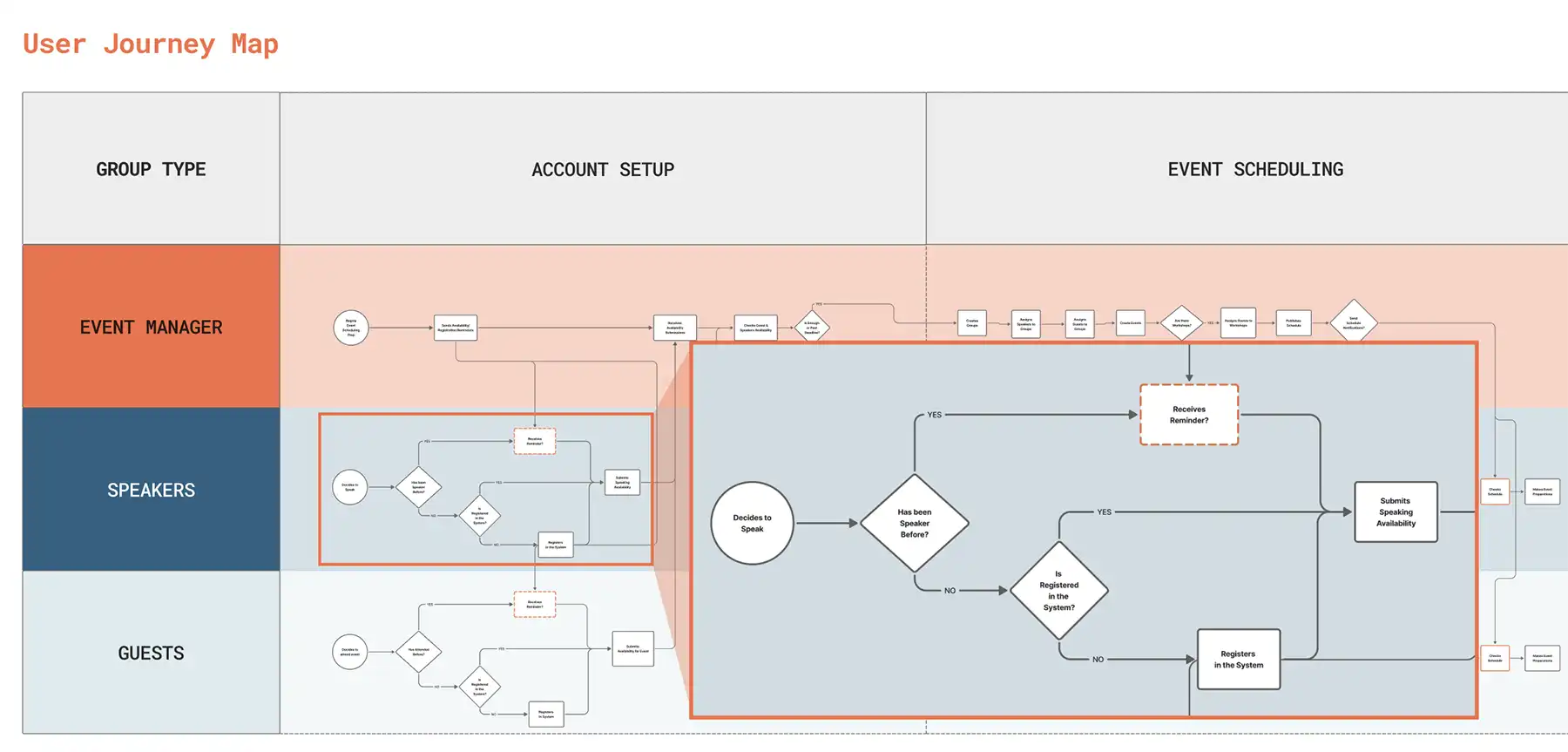
Steps to creating a User Journey Map:
- Identify the Trigger: Determine the specific event in the user’s world that makes them open the application.
- Map the Actions: Lay out the system interactions required for the end user to successfully complete this journey.
- Identify Friction: Locate where users get frustrated, confused, or experience device failure.
- Outcomes: Define what success will look like.
Why is a visual tool like this necessary? Because it gives everyone the same definition of success. Designers, developers, executives, and stakeholders may each see the problem differently, but they can all evaluate whether each step moves the user closer to the intended outcome.
As a result, conversations shift from “Should we build this feature?” to “Does this help the user accomplish their goal?” That simple shift helps teams reduce unnecessary scope, avoid gutting value out of an MVP, and keep projects aligned with the outcomes they were intended to deliver.
Client Value & ROI
When we rigorously define functionality through mapping, the benefits to the organization are immediate:
- Leaner Scope: It helps strip away features that don't actually help the user reach their goal.
- Team Alignment: Designers, developers, and stakeholders all look at the same map, ensuring everyone agrees on software behavior.
- Early Gap Identification: Mapping reveals missing steps long before they become expensive "emergency" additions.
Conclusion
“What does it do?” is the bridge between a great idea and a working reality. It transforms vague desires into a sequence of intentional actions that a team can execute with confidence. When that understanding is captured in a User Journey Map, everyone has a shared definition of what success looks like. The result is a project that stays focused, avoids unnecessary complexity, and delivers a solution that actually solves the intended problem.
Next in the series, we'll explore "How will it work?", where we dive into technical execution, stack selection, and the architectural principles that ensure your software is scalable, secure, and built to last.





Amber Asaro
As a UX Research Strategist, Amber brings extensive experience using research to guide product strategy, reduce risk, and uncover new opportunities. With a background spanning UX research, design, and technology, she turns complex business and user needs into actionable direction. Amber writes about user research, product strategy, human-centered design, and the evolving role of AI in software.

Nikita Nilges
As a UX Strategist and Lead Product Designer, Nikita has been at the forefront of many strategic software initiatives with The Smyth Group. A firm believer that every detail matters, she brings a high level of craftsmanship and research to every project. Nikita writes about software strategy, the UX design process, and the value of user research.